Quick Answer
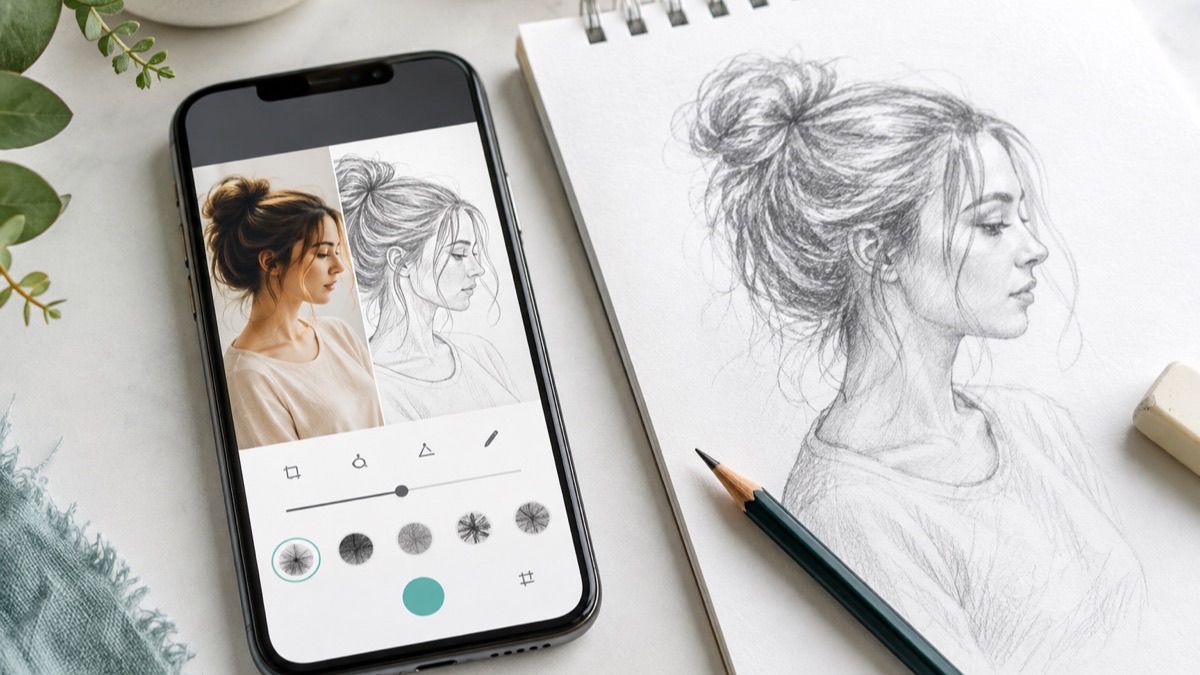
A photo-to-sketch app turns the colors and textures in a photograph into a simpler drawing reference. For useful practice, choose a clear photo, crop it to one subject, create a clean outline or light pencil-style version, and copy only the largest shapes first. Check height, width, angles, and a few anchor points before adding details. Then put the converted image away and redraw the subject once more from the original photo. That last freehand pass is what turns a convenient conversion into observation practice.
Open How to Draw for Photo to Sketch, projector tools, guided lessons, and paper-based practice on iPhone or iPad.
What a Photo-to-Sketch App Actually Does
A photograph contains more information than most beginners need: color shifts, reflections, surface texture, background clutter, and thousands of tiny value changes. A sketch conversion reduces that information. Depending on the effect, it may emphasize edges, group light and dark areas, remove color, or imitate graphite marks. The result is not a finished drawing lesson by itself. It is a cleaner map of the subject.
The most useful map preserves three things: the outer silhouette, the placement of major features, and the direction of important lines. For a portrait, those might be the head shape, eye line, nose angle, and hair mass. For a flower, they might be the center, the tilt of each stem, and the largest petal groups. For a mug, they are the height-to-width ratio, the ellipse at the rim, and the shape of the handle.
How to Draw includes a Photo to Sketch feature that can create this kind of reference and pair it with a projector-style paper workflow. The goal should still be a drawing you understand and can revise—not a line-for-line copy you are afraid to change.
Choose a Photo That Converts Well
Start with one subject that has a readable silhouette. A side-lit cup, a single flower, a pet sitting against a plain wall, or a face turned three-quarters toward the camera usually converts more clearly than a crowded group photo. Strong separation between subject and background helps the app find meaningful edges.
- Use clear focus. Motion blur and heavy filters can turn edges into noise.
- Look for simple lighting. One main light direction is easier to understand than several colored lights.
- Crop before converting. Remove furniture, signs, extra people, and empty space that do not support the drawing.
- Keep the subject large. Important features should not occupy only a tiny part of the image.
- Prefer photos you took. If someone else created the photograph, get permission or use a clearly licensed or public-domain image. The U.S. Copyright Office explains that the photographer generally owns the copyright from the moment the image is created.
Adjust the Conversion Without Losing the Subject
More detail is not automatically better. Begin with a light, clean effect and adjust one control at a time. Raise edge strength only until the main contour and important internal divisions appear. If hair, grass, fur, or fabric becomes a dark tangle, lower the detail or crop more tightly. If the subject becomes too pale, increase contrast slightly rather than adding every texture back.
Use a pencil-style result when you want help with broad values and texture. Use an outline-style result when you want to practice proportion, contour, or tracing. For paper transfer, a quiet reference with white space is usually easier to follow than a dramatic filter filled with black areas. Save the original photo beside the conversion so you can check what the filter simplified or misread.
A Step-by-Step Photo-to-Sketch Paper Workflow
- Select and crop. Choose one subject and crop to the composition you want to draw.
- Create two versions. Save a clean outline and, if useful, a soft pencil-style conversion. Compare both with the original.
- Mark the boundaries. On paper, place light dots for the subject’s top, bottom, left, and right edges.
- Find the largest shapes. Draw the head and torso, flower center and petal mass, or object body and handle before small features.
- Check angles and negative space. Compare the empty shapes around the subject as carefully as the subject itself.
- Add anchor features. Place only the few lines that control likeness: an eye line, rim ellipse, leaf direction, wheel axis, or joint position.
- Refine from the original photo. Use the photograph—not the filter—to decide which shadows, textures, and edges matter.
- Redraw freehand. Start a second small sketch without tracing. Use the original photo first and check the simplified reference only when stuck.

How to Use the Reference to Learn, Not Just Copy
Before drawing, name three observations out loud or write them beside the page: “the handle is narrower than the mug,” “the head tilts left,” or “the darkest leaf overlaps the rim.” Specific observations give your hand a job. The National Gallery of Art’s continuous-line activity similarly asks students to study the edges of a subject before drawing and to repeat the exercise because careful looking improves with practice.
Try the three-pass method. In pass one, trace or copy the converted outline to understand placement. In pass two, keep the reference visible but change something deliberately—line weight, shading, crop, expression, or background. In pass three, hide the sketch conversion and draw from the original photo. Compare the three pages for decisions, not perfection. If the freehand version is less exact but feels more alive, the practice worked.
The Getty’s contour-drawing guidance emphasizes looking back and forth between subject and page. Build that habit by pausing every thirty seconds. Ask whether the drawing is too tall, too wide, or leaning in the wrong direction. Correct large relationships early; a beautifully shaded eye cannot rescue a head placed at the wrong angle.
Common Photo-to-Sketch Mistakes
Tracing every generated line
Conversion effects can invent broken edges or overstate texture. Choose the lines that explain form. Ignore isolated specks, noisy hair strands, and background marks that do not help the subject read.
Using a busy or low-resolution photo
A filter cannot restore structure that the camera did not capture. Switch to a sharper image, simplify the crop, or choose a subject with clearer lighting.
Adding details before proportions
Block in the full silhouette and feature placement first. Step back or photograph the drawing to spot size errors before spending time on eyelashes, fur, or wood grain.
Stopping after the traced version
The first version builds familiarity; the second builds recall and control. A five-minute freehand redraw is more valuable than endlessly polishing the transferred outline.
Using any online image without checking rights
For private practice, the safest default is your own photo or an image whose license clearly allows your use. If you plan to publish, sell, or share a drawing closely based on someone else’s photograph, verify permission and the license first. This is practical copyright awareness, not legal advice.
A 15-Minute Practice Plan
Spend three minutes choosing and cropping one clear photo. Use two minutes to make and compare a simplified reference. Spend five minutes blocking in the main shapes and anchor points. Use three minutes to add one value group or texture that explains form. For the final two minutes, make a tiny freehand redraw from the original.
Repeat the same subject on three different days. On day one, use the converted reference freely. On day two, consult it only for major proportions. On day three, draw from the photo and use the conversion only for a final check. This gradual reduction of support makes improvement visible and keeps the tool in its proper role: a bridge between a complicated photograph and independent drawing.
Related Drawing Guides
- Drawing Projector App vs Lightbox
- Photo to Sketch Drawing Guide
- Photo to Sketch App Overview
- Pencil Sketch App for Photo References
- AR Drawing App: Trace Pictures on Paper With Your Phone
- How to Draw Animals for Kids
- How to Draw for Kids
References
- Apple App Store: How to Draw, Step by step
- National Gallery of Art: The Elements of Art—Form
- J. Paul Getty Museum: Framing the Landscape
- U.S. Copyright Office: What Photographers Should Know About Copyright
Download How to Draw, convert one clear photo, transfer the big shapes to paper, and finish with a freehand redraw.